


It’s been a few days since the first blog post. I got a bit distracted trying to add comment functionality to this website and it took way longer than expected lol. I’ve been solving a lot of LeetGPU challenges in the meantime as well though! It’s fun and very hard to stop so the blog posts are gonna lag behind by quite a lot 😆.
Anyways, I really enjoyed solving the challenge for day 2. It had a massive jump in difficulty from the last one imo and the solution involved some optimizations that were interesting to learn about and keep in mind for the future.
The Challenge: Matrix Multiplication
The task is to multiply two matrices. Given matrix A of dimensions MxN and matrix B of dimensions NxK, we need to compute the product matrix C = A x B, which will have dimensions MxK. All matrices are stored in row-major format.
Constraints:
- 1 ≤ M, N, K ≤ 8192
- Performance is measured with M = 8192, N = 6144, K = 4096
Example
Input: A (2x2) = [[1.0, 2.0], [3.0, 4.0]] B (2x2) = [[5.0, 6.0], [7.0, 8.0]]Output: C (2x2) = [[19.0, 22.0], [43.0, 50.0]]Here’s how we would solve this simply on the CPU:
M = N = K = 2A = [[1.0, 2.0], [3.0, 4.0]]B = [[5.0, 6.0], [7.0, 8.0]]C = []for m in range(M): C.append([]) # Initialize empty row on output for k in range(K): sum = 0.0 for n in range(N): sum += A[m][n] * B[n][k] C[m].append(sum)# C now contains [[19.0, 22.0], [43.0, 50.0]]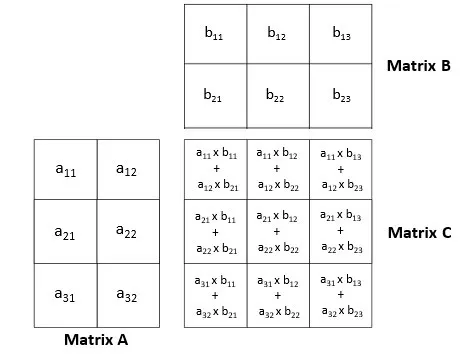
It basically does the following:
- Read A’s rows one by one (Row length: N)
m in range(M) - Read B’s columns one by one (Column length: N)
k in range(K) - For each element in the row x column pair, calculate
row[n] * col[n]and accumulate the result inC[m][k]through summationn in range(N)
Solving the Challenge
Initially I thought this would be pretty easy to solve. Just parallelize the loops and we’re good to go. But as I was writing the code I realized the naive way I was trying to solve it left a lot of performance on the table.
I think it’s a good starting point though and it’s good to see some bad examples too so we know what to avoid so let’s go through the naive solution first, pinpoint the parts that make it bad and then we can talk about the optimizations that turn it into the perfect kernel :)
Here’s the pseudocode for the naive solution:
Note
It’s very handwavy and might be hard to understand especially if you’re new to Triton or GPU programming. If that’s the case please start from the first challenge’s post and then come back to this post!
def matrix_multiply_gpu(A, B, C, M, N, K): # We need to parallelize the 3 loops BLOCK_SIZE_M = 2 # for rows of A (A is MxN -> M for rows) BLOCK_SIZE_K = 2 # for cols of B (B is NxK -> K for cols) BLOCK_SIZE_N = 2 # for elements in rows/cols (N for elements)
# Calculate the chunks we need to work on num_blocks_m = ceil(M / BLOCK_SIZE_M) num_blocks_k = ceil(K / BLOCK_SIZE_K) num_blocks_n = ceil(N / BLOCK_SIZE_N)
# Do a 3 dimensional grid gpu_programs = get_gpu_programs( x_id=num_blocks_m, # x for calculating offset into A's rows y_id=num_blocks_k, # y for calculating offset into B's cols z_id=num_blocks_n, # z for calculating offset into row/col elements )
# Read rows of A and cols of B gpu_programs.load_rows( from=A, offset=x_id * BLOCK_SIZE_M, count=BLOCK_SIZE_M, as=a_rows ) gpu_programs.load_cols( from=B, offset=y_id * BLOCK_SIZE_K, count=BLOCK_SIZE_K, as=b_rows )
# Read elements from the loaded rows and cols gpu_programs.load_elements( from=a_rows, offset=z_id * BLOCK_SIZE_N, count=BLOCK_SIZE_N, as=row_elements ) gpu_programs.load_elements( from=b_cols, offset=z_id * BLOCK_SIZE_N, count=BLOCK_SIZE_N, as=col_elements )
# Calculate the dot product of the loaded elements gpu_programs.dot_product( row_elements, col_elements, as=intermediate_result )
# We need to do accumulation since we're processing data in blocks # So we must read and then add and write gpu_programs.load_values( from=C, rows=x_id * BLOCK_SIZE_M, cols=y_id * BLOCK_SIZE_K, as=c_values ) gpu_programs.store_values( into=C, values=c_values + intermediate_result, at_rows=x_id * BLOCK_SIZE_M, at_cols=y_id * BLOCK_SIZE_K, )
# C is preallocated for usdef main(A, B, C, M, N, K): matrix_multiply_gpu(A, B, C, M, N, K)The main issues:
- RACE CONDITION (CRITICAL BUG, POTENTIAL FOR WRONG OUTPUT): Keeping in mind that multiple programs execute in parallel, we can see that the part at the end where we try to read from C, add to it, and then store it again (accumulation) is going to fail since multiple programs will try to read and write to it at the same time leading to overwrites and not actual accumulation.
- Efficiency (OPTIMIZATION): Relating to the output again. Accumulating into a GLOBAL location in GPU memory (Where C is) is slow. The intuition you must have to write fast kernels is that you must try to minimize the amount of loads and writes from and into the GLOBAL memory space of the GPU.
Note
Global GPU Memory and Why It’s Slow
When I talk about “global GPU memory”, I’m referring to the main GPU memory in your devices (the VRAM) where data like A, B, and C are stored. This is a large, slow* memory that all programs on the GPU can access.
*It’s actually usually faster than your normal RAM! The “slow” here is only relatively speaking.
Memory in GPU:
- Global memory (VRAM): Big but “slow”
- On-chip memory (Registers/Shared Memory): Very fast memory built into the chip. This includes:
- Registers: Each program (thread) has its own set of registers for storing local variables.
- Shared memory (SRAM): Fast memory that can be shared between programs in the same group.
So basically to write fast GPU kernels:
Load everything you need as little as possible, do as much work as you can using local variables (in on-chip memory), and only write to global memory once you have the final result.
The race condition is actually possible to solve by using atomics.
Atomics basically give us a way to do operations in a thread safe manner because they combine the read -> modify -> write steps into a single hardware level operation that happens at once atomically.
To fix this part in Triton we can use the atomic_add function.
Even with that though we still haven’t solved the efficiency problem AND if we use atomic_add it will make that efficiency problem even worse.
Atomics aren’t inherently slow but because there might be a lot of atomic_add operations being done in parallel for the exact same memory spot,
there’s a chance for high contention. The atomic operations will basically have to wait for other atomic operations to finish so they can get the latest value in the memory location.
So how do we solve this? Thankfully Triton’s docs just like the first challenge have a tutorial for this exact problem! Official Triton Tutorial on Matrix Multiplication. And as it turns out, there’s a way to do this without atomics and with no risk of race conditions, while also limiting the amount of loads and writes to global memory 🤯. The key idea is tiling combined with local accumulators.
Instead of parallelizing all three loops (for M, K, and N) globally across programs like in our naive solution, we:
- Parallelize only M and K globally (rows and columns of the output C) so each program handles one tile of the output
- Move the loop over N inside each program so each program iterates over N sequentially in chunks
- Use a local accumulator variable to accumulate results as we iterate over N chunks
- Only write to global memory once at the very end with the final result This way, each program computes one tile of the output matrix independently, so there’s no race condition. And since we’re doing all the accumulation in local variables, we avoid the slow global memory access until the very end.
Note
Important clarification about point 2:
If you remember from the first blog post, each program in Triton still uses threads that work in parallel! So when we say we “move the loop over N inside each program” in point 2, N is still being parallelized, just at a different level. That’s why I used “globally” above when talking about parallelization to emphasize that we still have “local” parallelization happening inside each program.
To recap what I mean by “global” and “local” parallelization:
- Global parallelization: Work is distributed across different programs. Each program handles a different piece of the overall problem, and all programs run in parallel. This is what we control with the grid size, more programs means more global parallelization.
- Local parallelization: Work is distributed across threads within a single program. Threads within the same program work in parallel on different parts of the data that program is processing. This happens automatically when you use operations on arrays in Triton, you don’t have to do anything special to achieve it.
For a refresher on how grids, blocks, and threads work in GPU programming (And programs in Triton), check out the “Grids, Blocks and Threads” section in the first blog post.
The approach uses some really important optimization concepts that we should really keep in mind and develop an intuition for not only for matrix multiplication but for any sort of GPU programming that we do. We’ll go through them in deeper detail in the optimizations section below.
Before we do that though let’s take a look at the final pseudocode:
def matrix_multiply_gpu(A, B, C, M, N, K): # We parallelize M and K GLOBALLY (rows and cols of output C) # So each program handles one tile of the output (C is MxK) # We still break N into chunks but we iterate over it LOCALLY inside each program BLOCK_SIZE_M = 64 # for rows of C (And A since they both have M rows) BLOCK_SIZE_K = 64 # for cols of C (And B since they both have K cols) BLOCK_SIZE_N = 64 # Chunk size for the local loop over N elements in rows/cols
# Calculate the chunks we need to work on num_blocks_m = ceil(M / BLOCK_SIZE_M) num_blocks_k = ceil(K / BLOCK_SIZE_K)
# Do a 2 dimensional grid gpu_programs = get_gpu_programs( x_id=num_blocks_m, # x for calculating offset into C and A's rows y_id=num_blocks_k, # y for calculating offset into C and B's cols )
# Inside each program allocate an accumulator in on-chip memory gpu_programs.allocate_local_memory( rows=BLOCK_SIZE_M, cols=BLOCK_SIZE_K, initial_values=0, as=local_accumulator, )
# Loop over the N elements of rows of A and cols of B in chunks in each program num_chunks_n = ceil(N / BLOCK_SIZE_N) for n_chunk in range(num_chunks_n): # Load BLOCK_SIZE_N elements from BLOCK_SIZE_M rows of A # Threads within each program work in parallel to load the elements gpu_programs.load_row_elements( from=A, row_offset=x_id * BLOCK_SIZE_M, row_count=BLOCK_SIZE_M, element_offset_in_row=n_chunk * BLOCK_SIZE_N, element_count=BLOCK_SIZE_N, as=a_elements )
# Load BLOCK_SIZE_N elements from BLOCK_SIZE_K cols of B # Threads within each program work in parallel to load the elements gpu_programs.load_col_elements( from=B, col_offset=y_id * BLOCK_SIZE_K, col_count=BLOCK_SIZE_K, element_offset_in_col=n_chunk * BLOCK_SIZE_N, element_count=BLOCK_SIZE_N, as=b_elements )
# Calculate the dot product of the loaded elements gpu_programs.dot_product( a_elements, b_elements, as=intermediate_result )
# Add the result to the local accumulator # It's all in local memory, no contention, no race condition and no slow global memory read and write!! gpu_programs.add(local_accumulator, intermediate_result, as=local_accumulator)
# After the loop, accumulator contains the final result for this tile # Now we write it to C ONCE (Just one global memory write per result) gpu_programs.store_values( into=C, values=local_accumulator, at_rows=x_id * BLOCK_SIZE_M, at_cols=y_id * BLOCK_SIZE_K, )
# C is preallocated for usdef main(A, B, C, M, N, K): matrix_multiply_gpu(A, B, C, M, N, K)Optimizations
Now let’s finally get into all the optimizations that are involved in the pseudocode we just saw that make it so efficient and develop an intuition for them so we can apply them anytime we do GPU programming.
Row-Major Ordering vs Grouped Ordering
When solving this problem a naive solution would be to have each program compute one entire row of the output matrix C. Let’s see what that would look like:
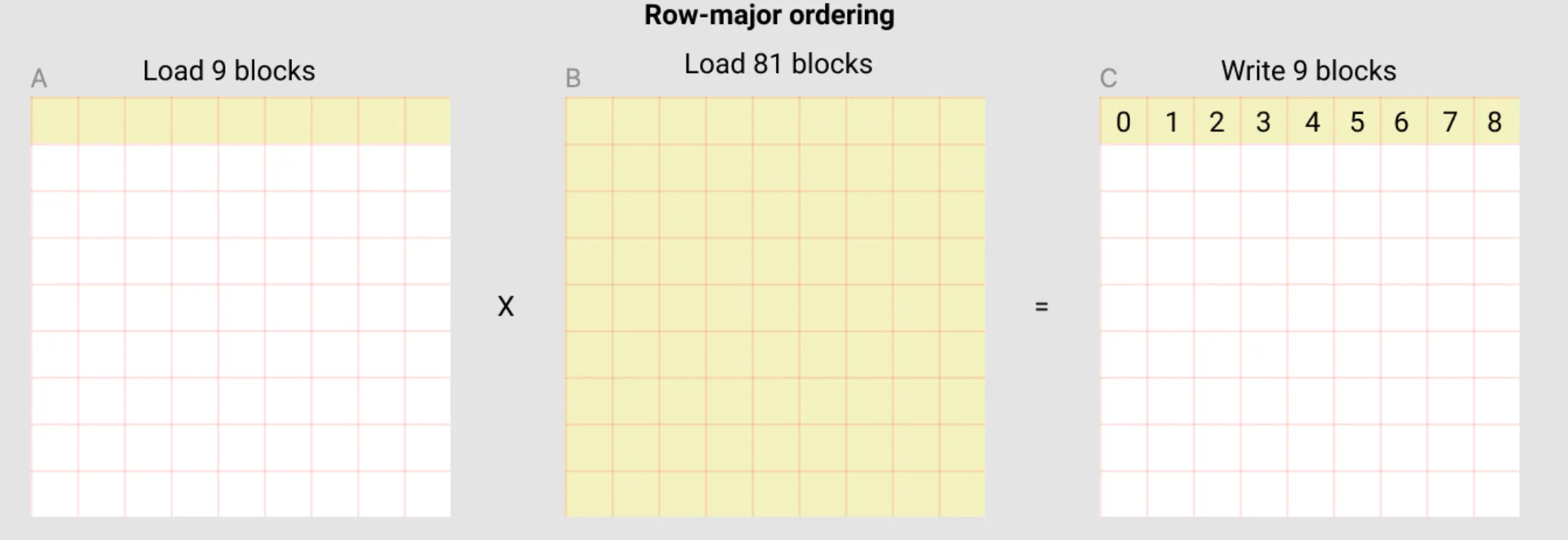
In this row-major ordering approach, each program would:
- Load one row from A (9 blocks in this example)
- Load the entire B matrix (81 blocks in this example)
- Compute one row of C and write it back (9 blocks)
- 90 loads -> 9 results
The issue:
- Every single program needs to load the entire B matrix. If we have 1000 programs computing 1000 rows, we’re loading all of B 1000 times!
We can do much better by using grouped ordering. We basically organize programs into groups that would each work on adjacent tiles in the output C:
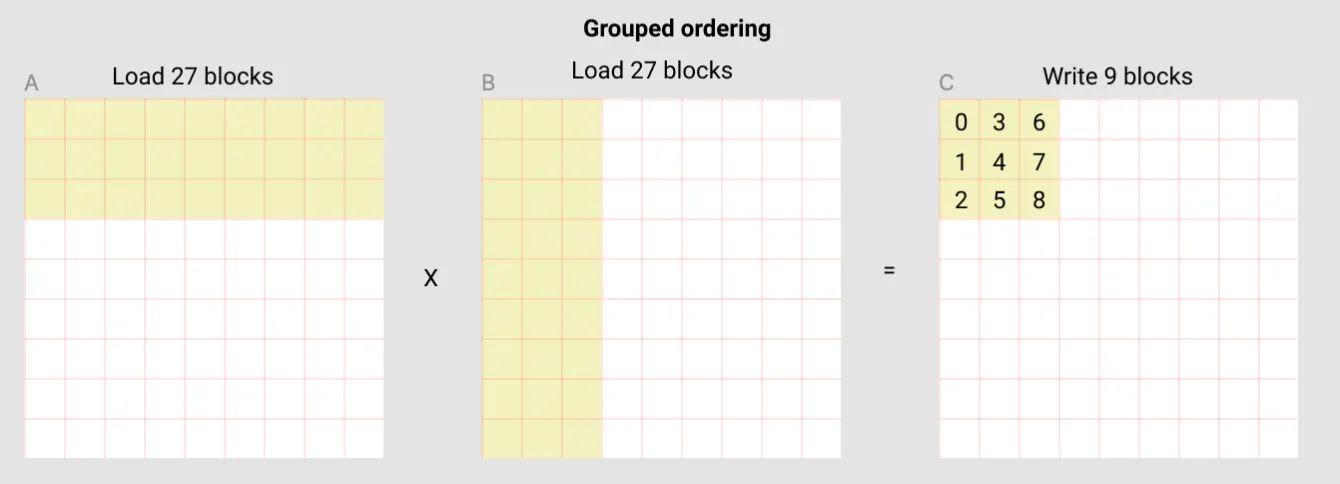
In this approach:
- We divide programs into groups that work to compute adjacent tiles in the output C
- Imagine 3 programs each working on 3x3 tiles (Like the tile in the image above) starting from top left (the tile being shown) to top right.
- The tiles these programs work on being adjacent is important for benefiting from the GPU’s memory cache! More on this later.
- Each program loads a tile from A (For 3 rows that’s 27 blocks in total)
- Each program loads a tile from B (For 3 columns that’s 27 blocks in total)
- Each program computes a 3x3 tile of C (9 blocks total)
- 54 loads -> 9 results
- Combining the 3 programs that we grouped together:
- Same 3 rows of A being loaded 3 times (27 blocks * 3 programs = 81 blocks total, but cache helps since they’re the same rows!)
- All columns of B being loaded across the 3 programs (27 blocks per program * 3 programs = 81 blocks total, which is all of B)
- In total: 81 loads from A + 81 loads from B = 162 loads
- 162 loads -> 27 results are MUCH better than 90 loads -> 9 results (specially considering that we also benefit from the cache)
This improves 2 things:
- Less Global Memory Reads: We’re loading much less data from the global memory for calculating the same amount of results.
- Cache Utilization: Since we make the programs in the same group work on adjacent tiles, they end up trying to load overlapping or nearby data in the global memory. This means a lot of the times the data might already be in the GPU’s cache for faster access than a normal direct read from the memory.
Local Accumulators
Another optimization being done is the local accumulation technique. Instead of reading from C, modifying it, and writing back (which causes race conditions and is slow), we use a local accumulator. Instead of relying on the global GPU memory for temporary results, we utilize the fast on-chip memory and only write to the global memory at the end ONCE.
This helps us:
- Avoid Race Conditions: Each program has its own accumulator, so there’s no need to read and write into the same global memory location.
- Achieve Better Performance: We’re doing all the work in fast on-chip memory and only touching the slow global memory once at the very end.
The Solution
It’s finally time for the actual implementation and the solution code! As we saw in the previous post, LeetGPU provides us with some boilerplate to get started. Here’s what they give us:
import torchimport tritonimport triton.language as tl
@triton.jitdef matrix_multiplication_kernel( a, b, c, M, N, K, stride_am, stride_an, stride_bn, stride_bk, stride_cm, stride_ck): pass
# a, b, c are tensors on the GPUdef solve(a: torch.Tensor, b: torch.Tensor, c: torch.Tensor, M: int, N: int, K: int): stride_am, stride_an = N, 1 stride_bn, stride_bk = K, 1 stride_cm, stride_ck = K, 1
grid = (M, K) matrix_multiplication_kernel[grid]( a, b, c, M, N, K, stride_am, stride_an, stride_bn, stride_bk, stride_cm, stride_ck )You’ll notice as you see the solution code below that it looks a bit different from the provided boilerplate because I don’t use the stride parameters that LeetGPU provides. It’s just a personal preference! I prefer to code those explicitly so I can calculate in my head what’s going on better and learn better without relying on helpers.
Another thing you’ll notice is that despite having said “When working on multi dimensional problems we can launch Triton programs using a grid with multiple dimensions so each program can have X, Y, Z… IDs” in the first blog post, in this solution we launch a one dimensional grid and calculate the X, Y IDs manually.
We could definitely use a 2d grid! But if you remember from the optimization section above,
we talked about needing to “group” multiple programs together and have them work on adjacent tiles.
By default when you launch a grid with multiple dimensions,
there’s no guarantee that program with ID=(0,0) is going to be working on data adjacent to program with ID=(0,1) and so on.
So we’ll lose the benefit of cache hits. There is a way to map the program_id in that case to a “logical” id that puts (0, 0) and (0, 1) adjacent to each other using some math that
a function called swizzle2d
in Triton can do for us. But I figured it’s better to explicitly calculate the ID since this is a tutorial and I want to learn and help you guys learn as well. Not to mention the tutorial in Triton’s official docs does the same!
Step 1. Boilerplate
Let’s start with the setup. As we saw before, LeetGPU provides the basic structure, but we’ll customize it for our needs:
import torchimport tritonimport triton.language as tl
@triton.jitdef matrix_multiplication_kernel( a, b, c, M, N, K, BLOCK_M: tl.constexpr, BLOCK_N: tl.constexpr, BLOCK_K: tl.constexpr, GROUP_SIZE: tl.constexpr): pass
# a, b, c are tensors on the GPUdef solve(a: torch.Tensor, b: torch.Tensor, c: torch.Tensor, M: int, N: int, K: int): BLOCK_M = 64 BLOCK_N = 32 BLOCK_K = 128 GROUP_SIZE = 4
grid = (triton.cdiv(M, BLOCK_M) * triton.cdiv(K, BLOCK_K), )
matrix_multiplication_kernel[grid]( a, b, c, M, N, K, BLOCK_M=BLOCK_M, BLOCK_N=BLOCK_N, BLOCK_K=BLOCK_K, GROUP_SIZE=GROUP_SIZE )From the top in solve:
BLOCK_M,BLOCK_N, andBLOCK_Kdefine the tile sizes we want to work with.BLOCK_Mis the amount of rows we want to handle from A and C per programBLOCK_Nis the amount of columns we want to handle from A, and the amount of rows we want to handle from B per program (the shared N that they both have)BLOCK_Kis the amount of columns we want to handle from B and C per program- Notice these aren’t all the same size (64, 32, 128). I did some experimentation and chose the values that gave the best performance for the specific sizes LeetGPU was benchmarking the solution against and the GPU it was running on.
GROUP_SIZEis how many programs we want to group together. Programs in the same group work on adjacent tiles to help with cache hits.- The grid size is
triton.cdiv(M, BLOCK_M) * triton.cdiv(K, BLOCK_K). This gives us the total number of tiles we need to compute. Again as I said above, we’re using a 1D grid and we’ll manually calculate the X, Y IDs for each program.
Step 2. Calculating the X, Y ID of Programs for Grouped Adjacency
Now we need to figure out which tile each program should work on. Remember that with grouped ordering we need to organize programs into groups that work on adjacent tiles.
@triton.jitdef matrix_multiplication_kernel( a, b, c, M, N, K, BLOCK_M: tl.constexpr, BLOCK_N: tl.constexpr, BLOCK_K: tl.constexpr, GROUP_SIZE: tl.constexpr): pid = tl.program_id(axis=0)
num_pid_m = tl.cdiv(M, BLOCK_M) num_pid_k = tl.cdiv(K, BLOCK_K) num_pid_in_group = GROUP_SIZE * num_pid_k
group_id = pid // num_pid_in_group first_pid_m = group_id * GROUP_SIZE group_size = tl.minimum(num_pid_m - first_pid_m, GROUP_SIZE)
pid_m = first_pid_m + ((pid % num_pid_in_group) % group_size) pid_k = (pid % num_pid_in_group) // group_sizeFrom the top:
pid = tl.program_id(axis=0)gets our program ID from the 1D grid.num_pid_m = tl.cdiv(M, BLOCK_M)calculates how many tile rows we need (How many chunks of sizeBLOCK_Mfit in M).num_pid_k = tl.cdiv(K, BLOCK_K)calculates how many tile columns we need (How many chunks of sizeBLOCK_Kfit in K).num_pid_in_group = GROUP_SIZE * num_pid_kis how many programs we put in each group. Each group handlesGROUP_SIZErows of tiles, and for each row we neednum_pid_kprograms (one per tile column).group_id = pid // num_pid_in_groupcalculates which group this program belongs to by dividing the program ID by the number of programs in each group.first_pid_m = group_id * GROUP_SIZEcalculates the index of the first tile row this group handles.group_size = tl.minimum(num_pid_m - first_pid_m, GROUP_SIZE)calculates the size of our group. Most groups areGROUP_SIZEbut the last group might be smaller ifBLOCK_Mdoesn’t divideMevenly.pid_m = first_pid_m + ((pid % num_pid_in_group) % group_size)calculates which tile row this program is supposed to handle within its group.pid_k = (pid % num_pid_in_group) // group_sizecalculates which tile column this program is supposed to handle within its group.
The “key” items from this portion that we calculate are pid_m and pid_k. These are the X, Y IDs of the program in the grid.
Step 3. Calculating the Offsets For Loading Data
Now we need to calculate the offsets for loading data from A and B.
Each program must load a tile of size BLOCK_M x BLOCK_N from A and a tile of size BLOCK_N x BLOCK_K from B.
offs_am = (pid_m * BLOCK_M + tl.arange(0, BLOCK_M)) offs_bk = (pid_k * BLOCK_K + tl.arange(0, BLOCK_K)) offs_n = tl.arange(0, BLOCK_N) a_ptrs = a + (offs_am[:, None] * N + offs_n[None, :] * 1) b_ptrs = b + (offs_n[:, None] * K + offs_bk[None, :] * 1)From the top:
offs_am = (pid_m * BLOCK_M + tl.arange(0, BLOCK_M))calculates the row indices we need from A.offs_bk = (pid_k * BLOCK_K + tl.arange(0, BLOCK_K))calculates the column indices we need from B.offs_n = tl.arange(0, BLOCK_N)creates indices for the N dimension (the dimension we’ll iterate over locally in the program).a_ptrs = a + (offs_am[:, None] * N + offs_n[None, :] * 1)sets up the locations in A we want to load data from. The[:, None]and[None, :]are used to reshape arrays so we can have a 2D grid of pointers since we want to load 2D tiles of data.offs_am[:, None]turnsoffs_aminto a 2D column vector with dimensionsBLOCK_M x 1.offs_n[None, :]turnsoffs_ninto a 2D row vector with dimensions1 x BLOCK_N.- When we multiply and add them, we get a
BLOCK_M x BLOCK_Ngrid of pointers through broadcasting. - Each pointer points to
A[row][col]where row comes fromoffs_amand col comes fromoffs_n. - Since A is MxN and stored in row-major format, element
A[i][j]is at offseti * N + jin memory. That’s why we multiplyoffs_am(row indices) byNand addoffs_n(column indices).
b_ptrs = b + (offs_n[:, None] * K + offs_bk[None, :] * 1)does the same for B, creating aBLOCK_N x BLOCK_Kgrid of pointers. Since B is NxK and stored in row-major format, elementB[i][j]is at offseti * K + jin memory. That’s why we multiplyoffs_n(row indices) byKand addoffs_bk(column indices).
Note
The [:, None] and [None, :] syntax might look weird if you’re not familiar with numpy.
Let’s break it down with some easy to understand examples:
[:, None]:
[1,2,3,4] -> [[1], [2], [3], [4]][None, :]:
[1,2,3,4] -> [[1, 2, 3, 4]]Step 4. Local Accumulation Loop
This is where we locally iterate over the elements in the tile, and save the results in a local accumulator.
accumulator = tl.zeros((BLOCK_M, BLOCK_K), dtype=tl.float32) for n in range(0, tl.cdiv(N, BLOCK_N)): # Load the next block of elements from A and B # We generate a mask by checking against N # Data outside of N is set to 0 so it doesn't affect the calculation a_vals = tl.load(a_ptrs, mask=offs_n[None, :] < N - n * BLOCK_N, other=0.0) b_vals = tl.load(b_ptrs, mask=offs_n[:, None] < N - n * BLOCK_N, other=0.0) accumulator = tl.dot(a_vals, b_vals, accumulator) # Advance the pointers to the next block of elements. a_ptrs += BLOCK_N * 1 b_ptrs += BLOCK_N * KFrom the top:
accumulator = tl.zeros((BLOCK_M, BLOCK_K), dtype=tl.float32)allocates our accumulator matrix and initializes it to 0. This will hold the partial results as we iterate.- The loop
for n in range(0, tl.cdiv(N, BLOCK_N))iterates over chunks ofBLOCK_Nelements over the N dimension of A and B. a_vals = tl.load(a_ptrs, mask=offs_n[None, :] < N - n * BLOCK_N, other=0.0)loads aBLOCK_M x BLOCK_Ntile from A. The mask checks if we’re still within bounds in the N dimension. We set values that are out of bounds to 0 usingother=0.0so that they don’t affect the calculation.b_vals = tl.load(b_ptrs, mask=offs_n[:, None] < N - n * BLOCK_N, other=0.0)same as above but loads tiles of sizeBLOCK_N x BLOCK_Kfrom B.accumulator = tl.dot(a_vals, b_vals, accumulator)we calculate the dot product of the loaded values usingtl.dotwhich performs matrix multiplication between a_vals (BLOCK_M x BLOCK_N) and b_vals (BLOCK_N x BLOCK_K), and adds the result to the accumulator. This gives us aBLOCK_M x BLOCK_Kresult, which is exactly the size of one tile of our output matrix C.a_ptrs += BLOCK_N * 1advances the pointers to the next chunk in the N dimension for A. For A since we advance in the same row, we just addBLOCK_Nto the pointer.b_ptrs += BLOCK_N * Kdoes the same as above for B but since for B we need to advance in the same column and not the same row, we need to addBLOCK_N * Kto the pointer.
Once this loop is finished, accumulator will contain the final result for our tile in C!
Step 5. Storing the Result
Finally, we need to store our computed tile in C.
offs_cm = pid_m * BLOCK_M + tl.arange(0, BLOCK_M) offs_ck = pid_k * BLOCK_K + tl.arange(0, BLOCK_K) c_ptrs = c + K * offs_cm[:, None] + 1 * offs_ck[None, :] c_mask = (offs_cm[:, None] < M) & (offs_ck[None, :] < K) tl.store(c_ptrs, accumulator, mask=c_mask)From the top:
offs_cm = pid_m * BLOCK_M + tl.arange(0, BLOCK_M)calculates the row indices we want to write to in C.offs_ck = pid_k * BLOCK_K + tl.arange(0, BLOCK_K)calculates the column indices we want to write to in C.c_ptrs = c + K * offs_cm[:, None] + 1 * offs_ck[None, :]sets up the locations in C where we want to store our computed tile. The[:, None]and[None, :]work the same way as explained above, creating aBLOCK_M x BLOCK_Kgrid of pointers through broadcasting. Since C is MxK and stored in row-major format, elementC[i][j]is at offseti * K + jin memory. That’s why we multiplyoffs_cmbyKand addoffs_ck.c_mask = (offs_cm[:, None] < M) & (offs_ck[None, :] < K)creates a mask to prevent out of bounds writes. We check that row indices are less than M and column indices are less than K.tl.store(c_ptrs, accumulator, mask=c_mask)stores our computed tile to C making sure to prevent out of bounds writes with the mask.
Step 6. Final Code
We’re done! Here’s the complete solution:
import torchimport tritonimport triton.language as tl
@triton.jitdef matrix_multiplication_kernel( a, b, c, M, N, K, BLOCK_M: tl.constexpr, BLOCK_N: tl.constexpr, BLOCK_K: tl.constexpr, GROUP_SIZE: tl.constexpr): pid = tl.program_id(axis=0)
num_pid_m = tl.cdiv(M, BLOCK_M) num_pid_k = tl.cdiv(K, BLOCK_K) num_pid_in_group = GROUP_SIZE * num_pid_k
group_id = pid // num_pid_in_group first_pid_m = group_id * GROUP_SIZE group_size = tl.minimum(num_pid_m - first_pid_m, GROUP_SIZE)
pid_m = first_pid_m + ((pid % num_pid_in_group) % group_size) pid_k = (pid % num_pid_in_group) // group_size
offs_am = (pid_m * BLOCK_M + tl.arange(0, BLOCK_M)) offs_bk = (pid_k * BLOCK_K + tl.arange(0, BLOCK_K)) offs_n = tl.arange(0, BLOCK_N) a_ptrs = a + (offs_am[:, None] * N + offs_n[None, :] * 1) b_ptrs = b + (offs_n[:, None] * K + offs_bk[None, :] * 1)
accumulator = tl.zeros((BLOCK_M, BLOCK_K), dtype=tl.float32) for n in range(0, tl.cdiv(N, BLOCK_N)): a_vals = tl.load(a_ptrs, mask=offs_n[None, :] < N - n * BLOCK_N, other=0.0) b_vals = tl.load(b_ptrs, mask=offs_n[:, None] < N - n * BLOCK_N, other=0.0) accumulator = tl.dot(a_vals, b_vals, accumulator) a_ptrs += BLOCK_N * 1 b_ptrs += BLOCK_N * K
offs_cm = pid_m * BLOCK_M + tl.arange(0, BLOCK_M) offs_ck = pid_k * BLOCK_K + tl.arange(0, BLOCK_K) c_ptrs = c + K * offs_cm[:, None] + 1 * offs_ck[None, :] c_mask = (offs_cm[:, None] < M) & (offs_ck[None, :] < K) tl.store(c_ptrs, accumulator, mask=c_mask)
# a, b, c are tensors on the GPUdef solve(a: torch.Tensor, b: torch.Tensor, c: torch.Tensor, M: int, N: int, K: int): # Tile sizes chosen through experimentation for this problem size and GPU architecture BLOCK_M = 64 BLOCK_N = 32 BLOCK_K = 128 GROUP_SIZE = 4
grid = (triton.cdiv(M, BLOCK_M) * triton.cdiv(K, BLOCK_K), )
matrix_multiplication_kernel[grid]( a, b, c, M, N, K, BLOCK_M=BLOCK_M, BLOCK_N=BLOCK_N, BLOCK_K=BLOCK_K, GROUP_SIZE=GROUP_SIZE )What’s Next
This challenge felt like a big step up from vector addition! Learning about optimization techniques like grouping for cache, tiling, and using local accumulators was very fun and felt productive since it’s definitely going to help us in the future!
With what we covered and learned while solving this challenge, the rest of the easy challenges on LeetGPU are going to be a breeze… except for one. I’m excited to write about that one once we get to it but for now I’ll keep which one I’m talking about a secret 😂