


In the previous post, I mentioned that with what we have learned so far, the rest of the easy challenges are going to be a breeze. That’s certainly true with today’s challenge specially now that we have a good grasp on the basics of GPU programming.
But this challenge’s optimal solution involves an optimization utilizing something called memory coalescing that we haven’t properly covered yet so that’s going to be our main focus today.
The Challenge: Matrix Transpose
The task is to transpose a matrix. Given a matrix A of dimensions rows x cols, produce the transpose A^T with dimensions cols x rows.
All matrices are stored in row-major format.
Constraints:
- 1 ≤ rows, cols ≤ 8192
- Input matrix dimensions: rows x cols
- Output matrix dimensions: cols x rows
Example
Input: A (2x3) = [[1.0, 2.0, 3.0], [4.0, 5.0, 6.0]]Output: A^T (3x2) = [[1.0, 4.0], [2.0, 5.0], [3.0, 6.0]]Here’s how we would solve this simply on the CPU:
rows = 2cols = 3A = [[1.0, 2.0, 3.0], [4.0, 5.0, 6.0]]A_T = []for c in range(cols): A_T.append([]) # Initialize an empty row for each column in the input for r in range(rows): # Write elements from input[row][col] to output[col][row] A_T[c].append(A[r][c])# A_T now contains [[1.0, 4.0], [2.0, 5.0], [3.0, 6.0]]It basically does the following:
- Iterate over the columns and rows of the input matrix
A - Write elements from
A[r][c]toA_T[c][r]swapping rows and columns in the process
Solving the Challenge
This challenge is extremely easy to solve. And even without knowing about the optimization that we’re going to cover today, if you attempt to solve it, chances are the solution you come up with might actually be utilizing it without you knowing!
So to really highlight the optimization so that we can actually learn it and be able to apply it “knowingly”, I’m going to purposefully start us off with a naive solution that completely throws that optimization out the door 😂
The Naive Solution
In this solution:
- We launch a 1D grid of programs
- Each program reads
BLOCK_SIZErows of the input matrix - Each program writes those rows back into the output matrix as columns
Note
I know you might say “But what if a full row is too big and is too much to handle?” You’re right! that is a problem as well but please bear with me here, this naive solution is just for demonstration purposes to help explain memory coalescing more easily later so please assume best case scenario and consider small rows 😅
Let’s go over the pseudocode:
Note
If you’re new to Triton or GPU programming. The following code might be hard to understand. If that’s the case please start from the the first challenge’s post and then come back!
# Imagine we're dealing with a 8x8 matrixdef matrix_transpose_gpu(A, A_T, rows, cols): # Let's say each program will handle 2 rows BLOCK_SIZE = 2 # How many programs we need to handle all the rows program_count = ceil(rows / BLOCK_SIZE) gpu_programs = get_gpu_programs(count=program_count)
# Generate the indices in the input matrix we want to read values from gpu_programs.generate_matrix_indices( rows=BLOCK_SIZE, row_offset=program_id * BLOCK_SIZE, cols=cols, col_offset=0, as=input_indices ) # input_indices for program_id=0 would be for our 8x8 matrix: # [0, 1, 2, 3, 4, 5, 6, 7, 8, 9, 10, 11, 12, 13, 14, 15]
# Load the values from memory gpu_programs.load_values( from=A, indices=input_indices, as=elements )
# Transpose the indices we used for loading so we can write the values at their transposed location gpu_programs.generate_transposed_indices( original_indices=input_indices, original_rows=BLOCK_SIZE, original_row_offset=program_id * BLOCK_SIZE, original_cols=rows, original_col_offset=0, as=output_indices ) # output_indices for program_id=0 would now be: # [0, 8, 1, 9, 2, 10, 3, 11, 4, 12, 5, 13, 6, 14, 7, 15]
# Write the values to the output matrix at their new indices gpu_programs.store_values( into=A_T, indices=output_indices, values=elements )
def main(A, A_T, rows, cols): matrix_transpose_gpu(A, A_T, rows, cols)The main issues:
- Strided Memory Writes: As you can see in the
output_indicesarray, the indices are jumpy (Goes from 0 to 8, then from 1 to 9 and …). This causes the GPU to have to issue a lot more memory requests than if they were all grouped together nicely because it’s not able to coalesce the memory requests when they’re jumpy like this.
Before we go to the optimization section to talk about how memory coalescing works. Let’s quickly take a look at the optimal solution that uses memory coalescing and fixes this issue.
Here’s the pseudocode:
# Imagine we're dealing with a 8x8 matrixdef matrix_transpose_gpu(A, A_T, rows, cols): # Let's say each program will handle a 4x4 tile BLOCK_SIZE_X = 4 BLOCK_SIZE_Y = 4
# Launch a 2D grid of programs gpu_programs = get_gpu_programs( x_id=ceil(rows / BLOCK_SIZE_X), y_id=ceil(cols / BLOCK_SIZE_Y) )
# Generate the indices in the input matrix we want to read values from gpu_programs.generate_matrix_indices( rows=BLOCK_SIZE_X, row_offset=x_id * BLOCK_SIZE_X, cols=BLOCK_SIZE_Y, col_offset=y_id * BLOCK_SIZE_Y, as=input_indices ) # input_indices for program_id=(0, 1) would be: # [4, 5, 6, 7, 12, 13, 14, 15, 20, 21, 22, 23, 28, 29, 30, 31]
# Load the values from memory gpu_programs.load_values( from=A, indices=input_indices, as=elements )
# Transpose the values in local memory # Elements we loaded are now transposed within their tile as the matrix gpu_programs.transpose( elements=elements, as=transposed_elements )
# Generate the indices in the output matrix we want to write those values to # Notice how instead of transposing the indices we generate the indices directly # By swapping the row and column information gpu_programs.generate_matrix_indices( rows=BLOCK_SIZE_Y, row_offset=y_id * BLOCK_SIZE_Y, cols=BLOCK_SIZE_X, col_offset=x_id * BLOCK_SIZE_X, as=output_indices ) # output_indices for program_id=(0, 1) would be: # [32, 33, 34, 35, 40, 41, 42, 43, 48, 49, 50, 51, 56, 57, 58, 59]
# Write the transposed values to the output matrix at the new indices gpu_programs.store_values( into=A_T, indices=output_indices, values=transposed_elements )
def main(A, A_T, rows, cols): matrix_transpose_gpu(A, A_T, rows, cols)As you can see, in this solution when we’re asking the GPU to access the global memory for us (whether for reading or writing), the indices we’re giving it are all nicely grouped together when they’re close. This helps the GPU coalesce those into single memory transactions which help us a lot.
Optimizations
Now let’s get into what exactly this memory coalescing thing we’ve been talking about is, so we know how to properly talk about it and use it beyond just saying “consecutive memory access = fast”.
Memory Coalescing
To understand memory coalescing, we first need to understand how threads execute on the GPU.
Note
For a refresher on how grids, blocks, and threads work in GPU programming (And programs in Triton), check out the “Grids, Blocks and Threads” section in the first blog post.
In hardware, threads are organized into groups called warps (on Nvidia GPUs or wavefronts on AMD GPUs). Threads within a warp execute in lockstep which means they all execute the same instruction at the same time just on different data. So that means any memory access instruction being executed, is executed in a warp which has 32 threads running at the same time where each thread can be trying to access some memory address (independent of the addresses being requested by other threads).
The GPU hardware looks at these 32 addresses that the warp is trying to access (from the 32 threads in the warp) and asks: “What’s the least amount of memory transactions I can execute to handle all the requests?”
This is determined by how many cache lines the addresses fall into. A cache line is a chunk of contiguous memory that the GPU can request at once. If all 32 addresses fall within the same cache line, the hardware can satisfy all 32 requests with a single memory transaction (memory read or write). This is extremely efficient!
This is called memory coalescing. When threads in a warp access memory addresses that fall within the same cache line(s), the hardware combines these requests into fewer, larger memory transactions. The fewer transactions needed, the better the performance. And if the addresses are scattered across many different cache lines, the hardware needs to make many separate transactions, which is slow. This is uncoalesced access.
So the intuition we’re building here is this: Whenever you do memory operations, ask are all the addresses being accessed currently close to each other without being too jumpy? If not is there a way to modify my algorithm to make that happen?
Let’s look at how this applies to our two solutions using an example 8x8 matrix:
Note
In this example let’s pretend each warp is actually a group of 4 threads instead of 32 for simplicity. And let’s say cache line size is also big enough for 4 elements only.
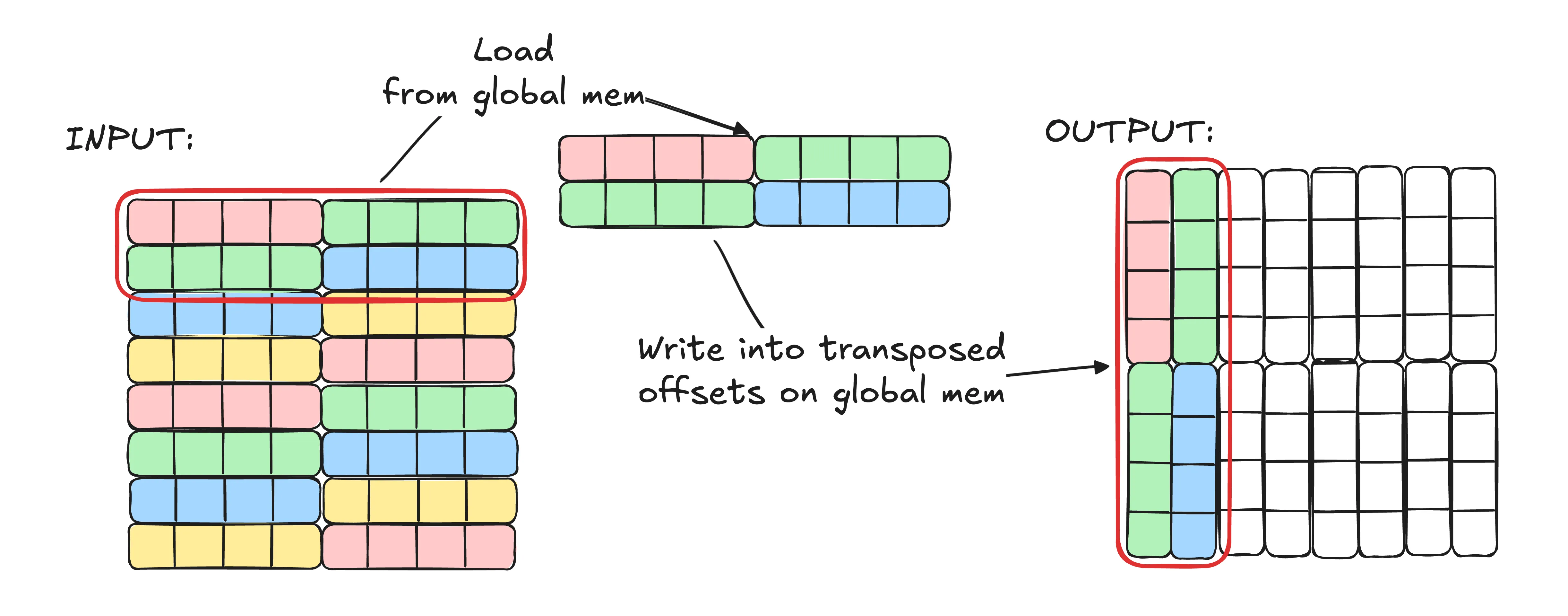
In the naive solution we did which we’re illustrating in the image above:
- We read 2 rows, each with 8 elements (16 elements total). Since the matrix is in row-major format, we’re reading elements
[0..15]- Warps issue the following load requests:
[0..3],[4..7],[8..11],[12..15](Keep in mind we said each warp has only 4 threads so that’s why reads are broken down into groups of 4 addresses at a time rather than one big request of all addresses) [0..3]is coalesced to a single memory transaction[4..7]is coalesced to a single memory transaction[8..11]is coalesced to a single memory transaction[12..15]is coalesced to a single memory transaction
- Warps issue the following load requests:
- We transpose the indices we used for loading and write the elements to their new transposed locations.
- Warps issue the following store requests:
[0, 8, 1, 9],[2, 10, 3, 11],[4, 12, 5, 13],[6, 14, 7, 15] [0, 8, 1, 9]is coalesced to 2 memory transactions (0, 1 are on the same cache line | 8 and 9 are on the same cache line)[2, 10, 3, 11]is coalesced to 2 memory transactions[4, 12, 5, 13]is coalesced to 2 memory transactions[6, 14, 7, 15]is coalesced to 2 memory transactions
- Warps issue the following store requests:
Stats:
- Memory transactions during load: 4
- Memory transactions during store: 8
- Total memory transactions: 12
- Elements transposed: 16
- Elements / Memory TX: 16 / 12 = 1.33
As you can see our reads are actually perfect for memory coalescing. We read 4 contiguous elements at a time that are aligned super well. But our writes jump around and involve 2 cache lines resulting in double the work.
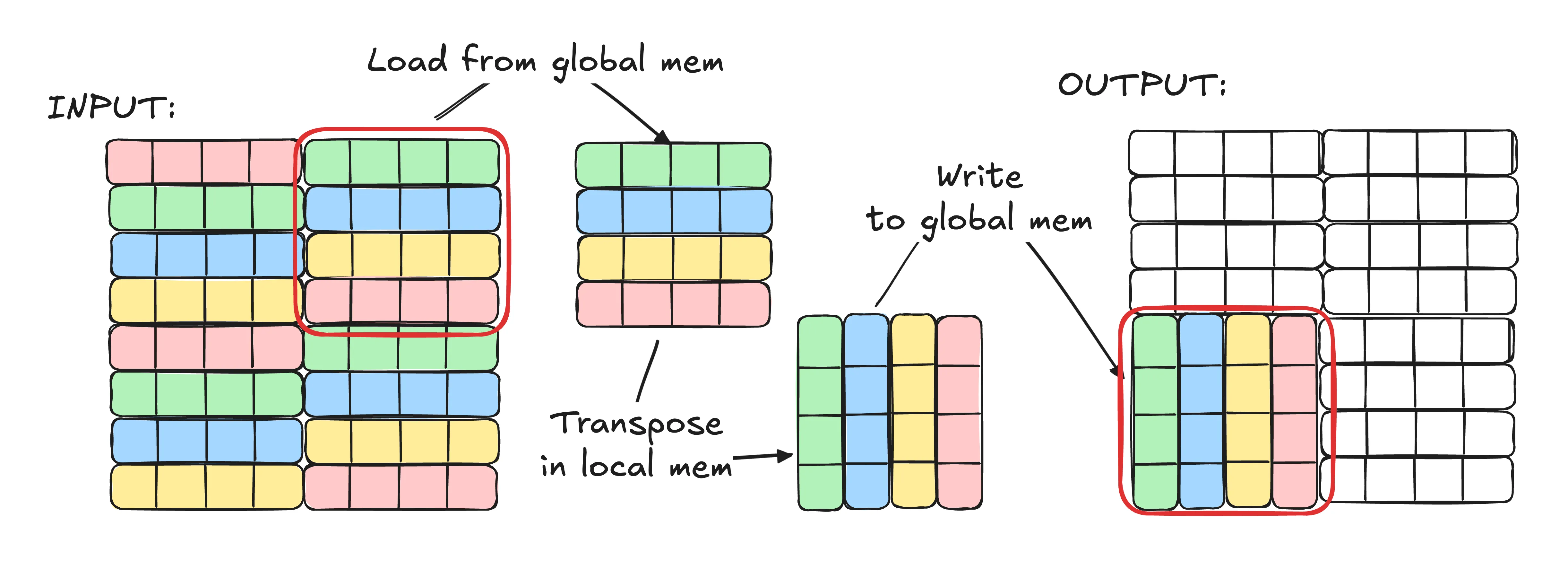
Now let’s look at the tiled solution:
- We load a 4x4 (16 elements total) tile from the input matrix. In this example we’re loading the top right tile.
- Warps issue the following load requests:
[4..7],[12..15],[20..23],[28..31] [4..7]is coalesced to a single memory transaction[12..15]is coalesced to a single memory transaction[20..23]is coalesced to a single memory transaction[28..31]is coalesced to a single memory transaction
- Warps issue the following load requests:
- We transpose the tile in local memory. (No global memory access here!)
- We write the transposed tile back to the output matrix by calculating the new indices we want to write to.
- Warps issue the following store requests:
[32, 33, 34, 35],[40, 41, 42, 43],[48, 49, 50, 51],[56, 57, 58, 59] [32, 33, 34, 35]is coalesced to a single memory transaction[40, 41, 42, 43]is coalesced to a single memory transaction[48, 49, 50, 51]is coalesced to a single memory transaction[56, 57, 58, 59]is coalesced to a single memory transaction
- Warps issue the following store requests:
Stats:
- Memory transactions during load: 4
- Memory transactions during store: 4
- Total memory transactions: 8
- Elements transposed: 16
- Elements / Memory TX: 16 / 8 = 2
As you can see in this version not only are our reads perfect for memory coalescing, but also our writes have become memory coalescing friendly as well! You might worry about transposing the elements locally but keep in mind local memory latency is negligible compared to global memory latency so taking a local hit to save on global access makes sense here!
The Solution
Now that we covered the main part of today’s blog post, let’s get into the solution code!
Step 1. Boilerplate
Let’s start with the setup. The boilerplate LeetGPU provides is pretty close to what we need, we just need to fill in the kernel:
import torchimport tritonimport triton.language as tl
@triton.jitdef matrix_transpose_kernel( input, output, rows, cols, TILE_X: tl.constexpr, TILE_Y: tl.constexpr): pass
# input, output are tensors on the GPUdef solve(input: torch.Tensor, output: torch.Tensor, rows: int, cols: int): TILE_X = 64 TILE_Y = 128 grid = (triton.cdiv(rows, TILE_X), triton.cdiv(cols, TILE_Y)) matrix_transpose_kernel[grid]( input, output, rows, cols, TILE_X=TILE_X, TILE_Y=TILE_Y )From the top in solve:
TILE_XandTILE_Ydefine the tile dimensions.TILE_Xis the number of rows we handle per tile, andTILE_Yis the number of columns. I chose 64 and 128 through experimentation to get good performance for the specific sizes LeetGPU was benchmarking the solution against and the GPU it was running on.- The grid is 2D:
(triton.cdiv(rows, TILE_X), triton.cdiv(cols, TILE_Y)). This creates a grid where each program gets an X ID (for rows) and a Y ID (for columns).
As you can see this time we’re using a 2D launch grid instead of the 1D grid we used in the previous challenge despite also using a tiled approach. If you remember, in the last challenge we needed to group programs together to help with cache hits because multiple programs could be accessing the same data in the global memory (like reading the same row). And to group programs that access similar data together, we had to calculate the X, Y IDs manually.
But in this challenge, we don’t really have duplicate data access between programs. Each program handles a unique part of the input and the output matrix so we can just ignore grouping and use a basic 2D grid and use the program IDs directly with no extra math.
Step 2. Calculating Indices for Load
First let’s prepare the indices we want to load data from in the input matrix.
@triton.jitdef matrix_transpose_kernel( input, output, rows, cols, TILE_X: tl.constexpr, TILE_Y: tl.constexpr): pid_x = tl.program_id(axis=0) pid_y = tl.program_id(axis=1)
offset_r = pid_x * TILE_X offset_c = pid_y * TILE_Y
indices_r = tl.arange(0, TILE_X) indices_c = tl.arange(0, TILE_Y)
load_r = offset_r + indices_r load_c = offset_c + indices_cFrom the top:
- Get the X and Y coordinates of the program in the 2D launch grid.
pid_x = tl.program_id(axis=0)pid_y = tl.program_id(axis=1)
- Calculate the starting row and column offsets for this tile
offset_r = pid_x * TILE_Xoffset_c = pid_y * TILE_Y
- Create arrays of indices for each dimension within the tile
indices_r = tl.arange(0, TILE_X)->[0, 1, 2, ..., TILE_X-1]for row indices within the tile.indices_c = tl.arange(0, TILE_Y)->[0, 1, 2, ..., TILE_Y-1]for column indices within the tile.
- Add the offset to the indices we have to get the actual row and column indices we need from the input matrix.
load_r = offset_r + indices_r->[offset_r, offset_r + 1, ..., offset_r + TILE_X - 1]load_c = offset_c + indices_c->[offset_c, offset_c + 1, ..., offset_c + TILE_Y - 1]
Step 3. Loading the Input Tile
Now let’s load the tile from the input matrix using the indices we just calculated.
input_ptrs = input + load_r[:, None] * cols + load_c[None, :] in_mask = (load_r[:, None] < rows) & (load_c[None, :] < cols) values = tl.load(input_ptrs, mask=in_mask)From the top:
input_ptrs = input + load_r[:, None] * cols + load_c[None, :]creates a 2D grid of pointers to the elements in the input matrix we want to load. The[:, None]and[None, :]reshape the arrays so broadcasting creates aTILE_X x TILE_Ygrid of pointers. Since the input is stored in row-major format, element at rowiand columnjis at offseti * cols + jin memory.in_mask = (load_r[:, None] < rows) & (load_c[None, :] < cols)creates a 2D boolean grid we can use as a mask to prevent out-of-bounds reads. We check that row indices are less thanrowsand column indices are less thancols.values = tl.load(input_ptrs, mask=in_mask)loads the elements from the input matrix into local memory.
Note
If you’re not familiar with the [:, None] and [None, :] syntax, check out the explanation in the matrix multiplication post where we covered it in detail!
Step 4. Transposing the Loaded Tile and Writing to Output
Now there’s only 2 things left to do. Transpose the loaded tile and write it to the output matrix.
output_ptrs = output + load_c[:, None] * rows + load_r[None, :] out_mask = (load_c[:, None] < cols) & (load_r[None, :] < rows) tl.store(output_ptrs, tl.trans(values), mask=out_mask)From the top:
- Just like above for loading, we create a 2D grid of pointers BUT this time for writing to the output matrix. And since we’re transposing the matrix,
load_cbecomes the “rows” andload_rbecomes the “columns”.output_ptrs = output + load_c[:, None] * rows + load_r[None, :]out_mask = (load_c[:, None] < cols) & (load_r[None, :] < rows)
- We use
tl.trans(values)to transpose the loaded tile in local memory and then write it to the output matrix at the indices we calculated above by swapping the rows and columns.tl.store(output_ptrs, tl.trans(values), mask=out_mask)
Step 5. Final Code
We’re done! Here’s the full code for the solution:
import torchimport tritonimport triton.language as tl
@triton.jitdef matrix_transpose_kernel( input, output, rows, cols, TILE_X: tl.constexpr, TILE_Y: tl.constexpr): pid_x = tl.program_id(axis=0) pid_y = tl.program_id(axis=1)
offset_r = pid_x * TILE_X offset_c = pid_y * TILE_Y
indices_r = tl.arange(0, TILE_X) indices_c = tl.arange(0, TILE_Y)
load_r = offset_r + indices_r load_c = offset_c + indices_c
input_ptrs = input + load_r[:, None] * cols + load_c[None, :] in_mask = (load_r[:, None] < rows) & (load_c[None, :] < cols) values = tl.load(input_ptrs, mask=in_mask)
output_ptrs = output + load_c[:, None] * rows + load_r[None, :] out_mask = (load_c[:, None] < cols) & (load_r[None, :] < rows) tl.store(output_ptrs, tl.trans(values), mask=out_mask)
# input, output are tensors on the GPUdef solve(input: torch.Tensor, output: torch.Tensor, rows: int, cols: int): TILE_X = 64 TILE_Y = 128 grid = (triton.cdiv(rows, TILE_X), triton.cdiv(cols, TILE_Y)) matrix_transpose_kernel[grid]( input, output, rows, cols, TILE_X=TILE_X, TILE_Y=TILE_Y )What’s Next
You might have noticed that unlike the first two challenges we did, there’s no tutorials for this one in the official Triton docs anymore and we did it without referencing any external resources for help!
From here on, that’s going to be the case for most challenges as there’s no tutorials for them in the official docs. And it actually feels amazing to have learned so much already that we can tackle new problems on our own!
We’re really making progress! I’m excited to keep going with more challenges and see what other optimization techniques we’ll learn along the way 🚀